

Regent Resume for Senior Professionals
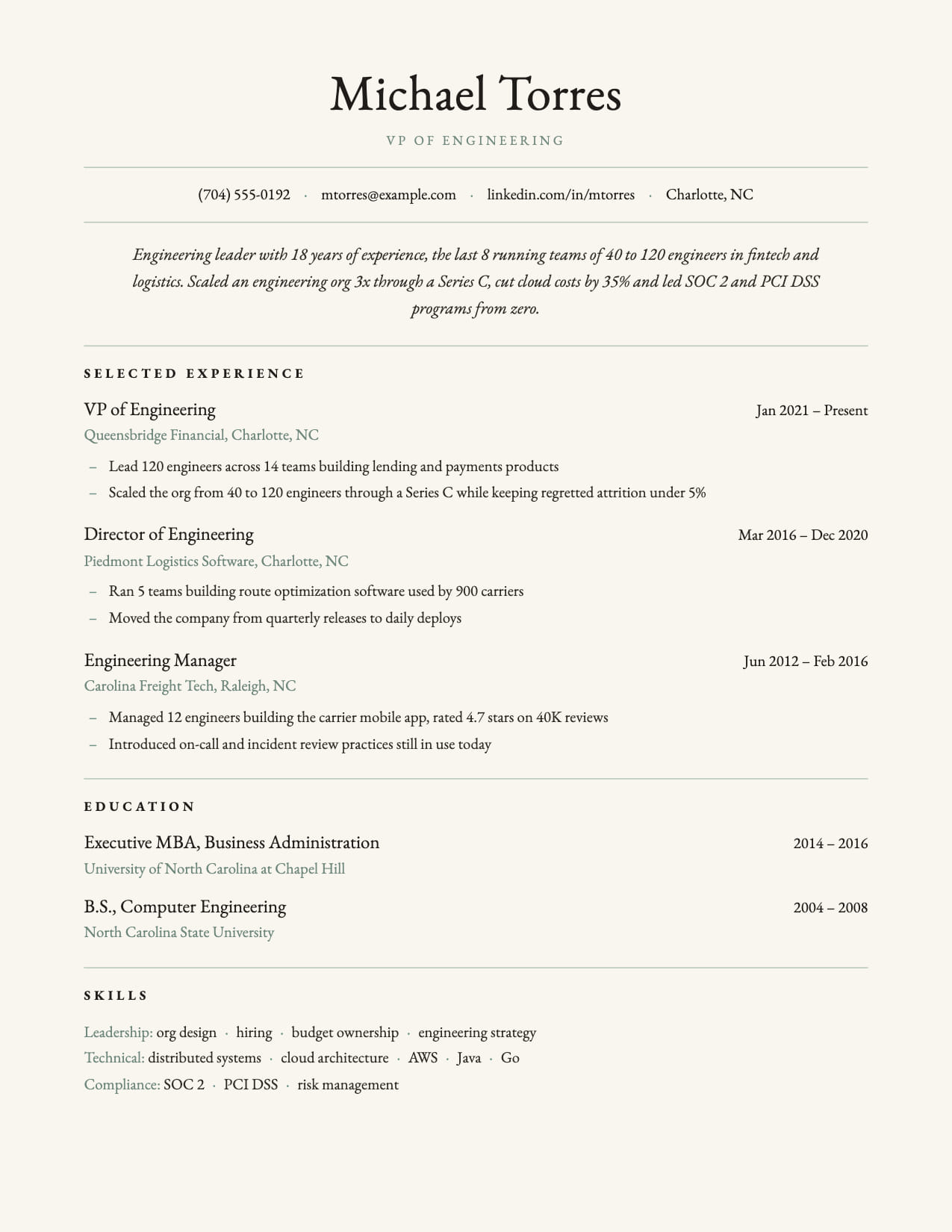
Cream canvas, centered serif header, hairline rules. The quiet authority of a partner-track resume.
No credit card · All templates free · Switch templates any time
About this template
Regent is CVEdge's most traditional template: a warm cream page, a centered serif name, small-caps section headings and hairline rules between sections. Nothing competes with the content. It reads like the letterhead of an established firm, which is exactly the signal senior candidates in law, finance and consulting want to send.
The layout is single column, so it parses cleanly through Workday, Greenhouse and iCIMS while still looking considered when a partner prints it. Experience entries lead with the role, put dates on the right, and use an em-dash marker for bullets so quantified outcomes read as a list of decisions rather than tasks.
Regent applies its own typography when picked: EB Garamond body, centered header, dot-separated contact line and a regular-weight name. You can override any of them in the Design tab, but the defaults are tuned so a director-level resume looks finished the moment it is uploaded.
Pair it with the AI summary rewrite: the italic summary block is the first thing a reader sees, and Regent gives it room to make a two-sentence case for the candidate.
Who is this template for?
- Partners, directors and VPs in law, finance and consulting
- Senior professionals in established, conservative industries
- Board and advisory candidates
- Anyone who wants a classic printed feel without a photo
Start with this template for free
Upload your existing resume or start from scratch. CVEdge pre-fills your content into the template and gives you an instant ATS score.
Why this template works for experienced professionals
Regent is for senior professionals in law, finance, consulting and other conservative fields, where the resume itself is read as a sign of judgment. The cream page, centered serif header and hairline rules give it the feel of firm letterhead. Underneath, it is a single column, so it works in portals as well as on a partner's desk.
Recommended section order
- 1Header: name, title, contact
- 2Summary
- 3Experience
- 4Board and advisory roles
- 5Education
- 6Admissions and certifications
At this level your recent roles carry the case, so Experience follows a short summary. Board seats, advisory roles and bar admissions come after it, and Education moves to the end unless the institution itself is a selling point.
What to put where
Summary
Two sentences in the italic block: your level, your practice area or function, and the scale you work at, such as deal size, team size or revenue.
Experience
For each role, one line of scope (team, budget, region) and then three to five bullets that read as decisions and their outcomes, not tasks.
Board and advisory
Organization, role and years. One line on what you contributed if it is relevant to the job you want.
Admissions and certifications
Bar admissions with state and year, or professional qualifications such as CFA or CPA. Keep it to a few lines.
Common mistakes with this template
- Going past two pages. Senior resumes need focus, not a full history. Summarize roles from more than 15 years ago in one line each.
- Writing bullets as responsibilities. At this level, readers want to know what you decided and what happened.
- Swapping the serif fonts for something trendy. The typography is a large part of what makes Regent work.
- Adding a photo. Regent is designed without one, and most US firms prefer that.
When to choose something else
Candidates at startups or in tech, where a traditional look can read as out of step will usually be better served by the Vantage layout.
Questions about this template
Is Regent ATS-safe with the cream background?+
Yes. The background is a page color, not an image or a table. The text is standard single-column, so parsers read it exactly as they read Classic. The color only affects how it looks on screen and in print.
Can I switch Regent to a sans-serif font?+
Yes. Regent sets EB Garamond as its default body font, but the Design tab lets you pick any of the four font families. The name, italic summary and section headings keep their serif identity so the template still reads as Regent.
How long should a senior executive resume be?+
Two pages is the norm. Put your last 10 to 15 years in detail and summarize earlier roles in a short 'Earlier career' list. A partner or board chair reads the first page closely and skims the second, so your strongest results belong on page one.
Is a serif font professional on a resume?+
Yes, and in law, finance and academia it is often the expected choice. Serif fonts like Garamond read as traditional and polished. They also parse without issue, because applicant tracking systems read the text, not the typeface.
Template features
- Cream page canvas printed edge to edge
- Centered serif name with small-caps title
- Hairline rules and em-dash bullets keep a formal rhythm
- Single column, fully ATS-parseable
- Serif defaults applied automatically on pick
More experienced professionals templates
View all
Executive Resume Template
Built for twenty years of career on two pages, with premium spacing and a summary that leads, on a single ATS-safe column. Free to edit online, or download as a blank Word file.

Executive Pro Resume Template
Bold photo header with dark contact bar. Leadership presence from the first line.

Executive Sidebar Resume Template
Dark sidebar with photo. Corporate and legal feel for senior roles.
Build your resume with Regent for free
Upload your existing resume or start fresh. ATS score included. No credit card required.